
FilterCodes
Maintained by
Michael Milette
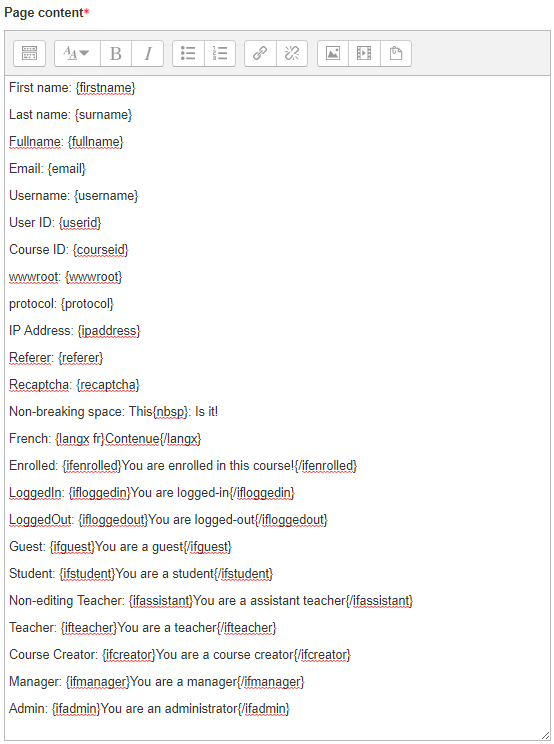
Transform your Moodle site with the FilterCodes Plugin! Elevate engagement by inserting about 200 dynamic plain-text tags like {firstname} to create personalized learning experiences, customize your site and course content, display progress bars, simplify Contact Form customization effortlessly and much more. FilterCodes empowers educators to revolutionize Moodle into a dynamic, personalized platform. Join the community of FilterCodes enthusiasts to unlock the potential of your Moodle LMS site.

Comments
Comments are no longer open for new posts. Existing comments remain available to read.
Recently I asked Michael a few questions about this amazing plugin! I was trying to make the filter codes work in the custom menu. Sadly the plugin didn’t seem to work and I didn’t see why it was not working. Since i asked Michael in a PM, my question and the response are not listed here:
My question:
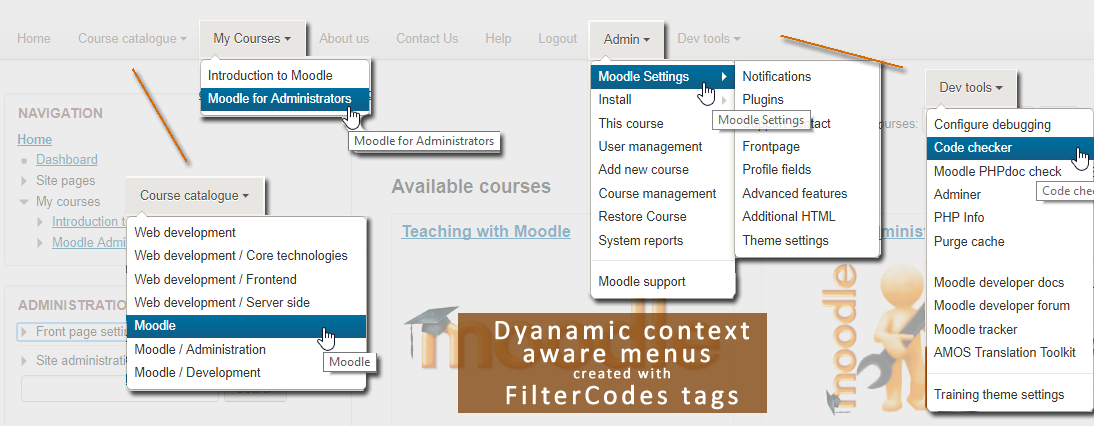
I am trying to use it to make custom admin menu items that only show for admins. To do this I am adding the codes you have given us in the documentation: https://github.com/michael-milette/moodle-filter_filtercodes/blob/dev050/README.md#usage
Am i doing something wrong?
~~~~~~~~~~~~~~~
Michaels response:
Many Moodle Themes don't support filters in the custom menu. In order to enable support, you will need to add the code provided in the FAQ section of the
documentation for the FilterCodes plugin.
To enable filter support for custom menus, see: https://github.com/michael-milette/moodle-filter_filtercodes/blob/master/README.md#can-i-use-filtercodes-in-custom-menus
As you are using the Boost theme, be sure to follow the instructions for themes based on boost, not for themes based on bootstrap. Note: If you make the change to the core Moodle theme instead of a child theme, you may need to remember to re-apply the change if you upgrade to a newer version of Moodle in the future.
As for your tags, if you just want your menu to show up for Administrators, the following will do:
{IFADMIN}ADMIN{/IFADMIN}
If you want it to appear for both Managers and Administrators, then use:
{IFMINMANAGER}ADMIN{/IFMINMANAGER}
In fact, you could put your whole menu inside the tags. There are examples of how to do this in the documentation as well. See: https://github.com/michael-milette/moodle-filter_filtercodes/blob/dev050/README.md#filtercodes-in-a-custom-menu
In that example, the only reason that I have both {IFMINMANAGER} and {IFADMIN} tags is because I wanted to demonstrate that you can create an admin menu that would be available to Managers and Admins, but with certain options only available to admins.
Thanks for your quick response.
I have made a feature request.
In case you were going to program these weeks, it would be cool if this request can be granted
And otherwise I will wait until May 2018
Thank you very much for this plug-in! This makes Moodle a whole lot more 'personal'.
Sincerely,
Kees Koopman.
Great suggestion for a new tag! It should be possible. Just go to the Bug Issue Tracker at https://github.com/michael-milette/moodle-filter_filtercodes/issues and add your suggestion for the new tag. Use the subject line with "Feature request: {ifmemberofgroup}". I will also need you to include a detailed example of how you might want to use this feature.
I can't make any promises but I will see if I can get it into the next release scheduled for May, around the same time as Moodle 3.5. If you need it sooner, you can submit a pull request. I am also available for hire.
Thanks again for taking the time to write. I really appreciate it.
Best regards,
Michael
This is a great plug-in! Thanks!
Is it possible to add a filtercode, such as: "IfMemberOfGroup xxx} and {/IfMemberOfGroup} (where XXX is the group-id)
That would be very nice!
You will get your answer.
I noticed that the latest version 0.4.2 with the fixed https ReCPATCHA issue is only available via Github.
Kind regards,
George
Thank you for bringing this up. Nice to know people check my work. These are actually empty/blank by design. Most people will not want to put anything in these fields.
They are for special situations where a user is not logged into your website but you still want them to have a first, last name, username and email address. I can't think of a situation like that but they are available just in case. You'll find more information on this in the FAQ section of documentation. See:
https://github.com/michael-milette/moodle-filter_filtercodes#when-a-user-is-logged-out-the-first-name-surname-full-name-email-address-and-username-are-empty-how-can-i-set-default-values-for-these-tags